 Add Icon
  Arrow Icon
  Briefcase Icon
  Calendar Icon
  Check Icon
  Crank Icon
  Delete Icon
  Docs Icon
  Email Icon
  Home Icon
  Key Icon
  Lock Icon
  Unlock Icon
  Minus Icon
  Monitor Icon
  Notes Icon
  Post Icon
  Printer Icon
  RSS Icon
  Warning Icon
  Write Icon
  Style 1
 Style 2
 Style 3
 Style 4
 Style 5
 Style 6
Module Positions
Super User
Published: 06 May 2012
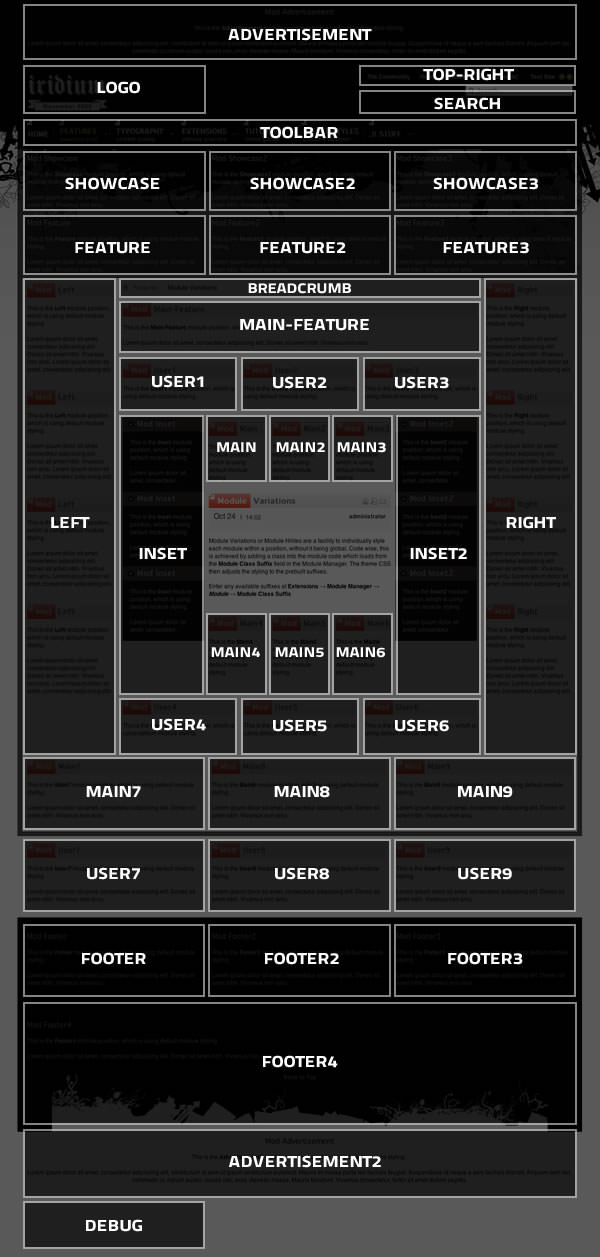
There are 40 module positions with this template that are collapsible (if no modules are published to the position, it will not appear).
Logo & Toolbar are conditional positions. There are other elements which occupy these areas, such as the logo image for Logo and the fusion menu for Toolbar. When you publish a module to these positions, it will collapse the theme element and replace with your module. If you wish to disable everything, hide the various elements in Extensions → Template Manager → rt_iridium_j15. Such an example would be setting Show Logo to No.
View all module positions live by appending ?tp=1 or &tp=1 to the end of your URL such as http://yoursite.com/index.php?tp=1.
The below diagram is of the Module Variations page.
Main Menu
Login Form
Who's Online
We have 18 guests and no members online